
Hi there! I'm Anuj Tomar, an enthusiastic and aspiring DevOps engineer and Cloud engineer with a passion for integrating development and operations to create seamless, efficient, and automated workflows. I'm driven by the challenges of modern software development and am dedicated to continuous learning and improvement in the DevOps field.
Welcome to Day 30 of the 90 Days of DevOps challenge!
Today, we dive into one of the most essential tools in the world of container orchestration: Kubernetes. Understanding Kubernetes is crucial for scaling and managing containerized applications, making it a key skill in any DevOps toolkit.
Kubernetes Overview
With the widespread adoption of containers among organizations, Kubernetes, the container-centric management software, has become a standard to deploy and operate containerized applications and is one of the most important parts of DevOps.
Originally developed at Google and released as open-source in 2014. Kubernetes builds on 15 years of running Google's containerized workloads and the valuable contributions from the open-source community. Inspired by Google’s internal cluster management system, Borg,
Tasks
What is Kubernetes? Write in your own words and why do we call it k8s?
Kubernetes is an open-source platform designed to automate the deployment, scaling, and management of containerized applications. It helps manage clusters of hosts running Linux containers, providing tools for deploying applications, scaling them as needed, managing changes to existing containerized applications, and helping optimize the use of underlying hardware beneath your containers.
The term "k8s" is a numeronym, which is a way of abbreviating a word by using the first and last letters and counting the number of letters in between. In "Kubernetes," there are eight letters between the "K" and the "s," hence the abbreviation "k8s." This shorthand is commonly used in the tech community to simplify communication.
What are the benefits of using k8s?
Here are some of the top reasons why organizations prefer Kubernetes:
Scalability: Easily scale applications up or down based on traffic.
Automation: Kubernetes automates the deployment, scaling, and management of containerized applications.
Self-healing: Automatically restarts failed containers and replaces or reschedules containers when nodes die.
Load balancing and service discovery: Automatically balances network traffic to ensure deployments run smoothly.
Declarative configuration: Use YAML files to declare the desired state of your system, and Kubernetes will work to maintain it.
Portability: Kubernetes works with any container runtime and can be deployed in various environments (on-prem, cloud, hybrid).
Explain the architecture of Kubernetes.
Kubernetes has a master node-worker node architecture:
Master Node: The control plane components are hosted on the master node. These components include:
API Server: Acts as the front-end for the Kubernetes control plane and is responsible for processing API requests.
Scheduler: Assigns work to worker nodes, deciding where to run containers based on resource requirements and policies.
Controller Manager: Ensures the desired state of the cluster and handles tasks like replication, scaling, and node management.
etcd: A distributed key-value store that stores the cluster's configuration data.
Worker Node: The worker nodes are responsible for running containers. They have the following key components:
Kubelet: Communicates with the API server and ensures containers are running in a Pod.
Container Runtime: The software responsible for running containers (e.g., Docker, containerd).
Kube Proxy: Maintains network rules on nodes and enables communication between Pods.
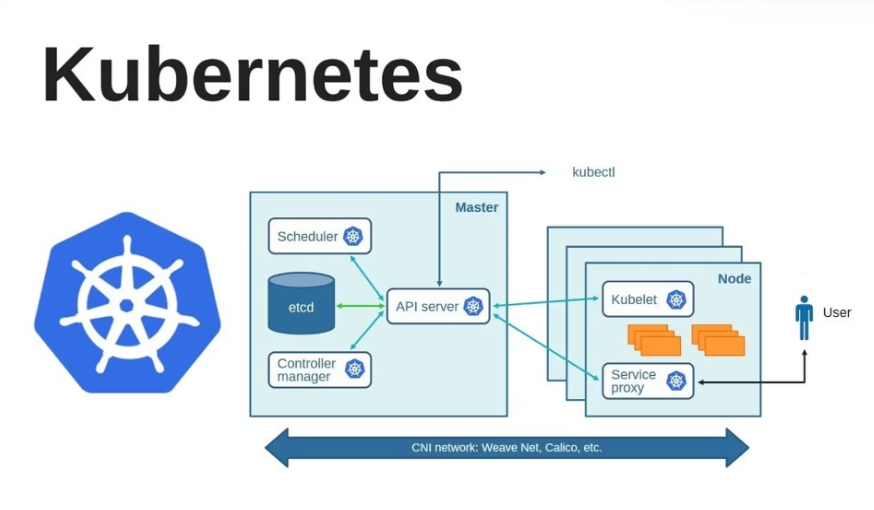
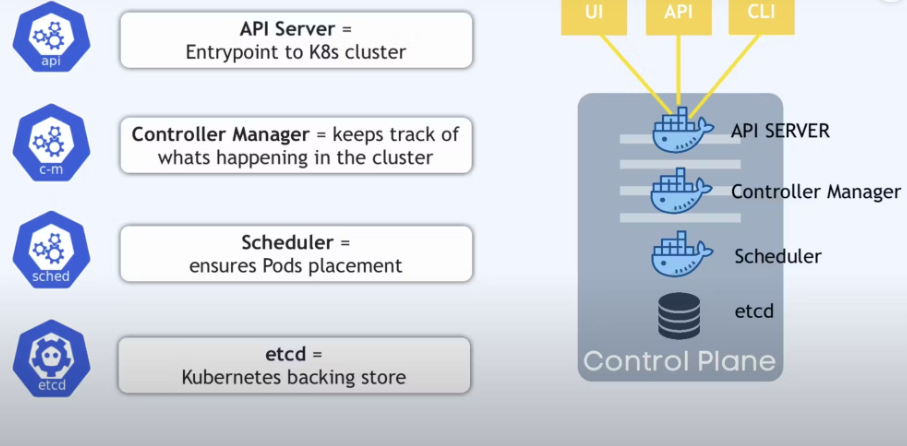
What is Control Plane?
- The Control Plane in Kubernetes refers to a crucial component responsible for managing the cluster and its state. It's the brains behind the entire Kubernetes system, overseeing and coordinating all activities within the cluster.
Components of the Control Plane:
API Server: Acts as the front end for the Kubernetes Control Plane. It validates and processes REST requests, serving as the gateway for cluster management.
Scheduler: Assigns workloads (pods) to nodes based on resource availability, policies, and constraints. It ensures efficient utilization of cluster resources by determining the best node for a pod to run.
Controller Manager: Manages various controllers that regulate the cluster's state, continuously monitoring and responding to changes. For example, it manages node status, replication controllers, endpoints, and more.
etcd: This distributed key-value store is a critical component that stores all cluster data, including configuration details, state information, and metadata. It serves as the cluster's source of truth.
Write the difference between kubectl and kubelets.
kubectl:
It's a command-line interface (CLI) tool used to interact with the Kubernetes API server. Using
kubectl, administrators can issue commands to create, manage, and inspect Kubernetes resources like pods, services, and deployments.Example:
kubectl get podsretrieves information about all running pods in the cluster.
kubelet:
It’s an agent that runs on every worker node and ensures that containers are running as expected. The kubelet communicates with the API server to get the instructions on what workloads (pods) to run on its node.
It checks the health of containers and reports back to the control plane if something is wrong.
Explain the role of the API server.
The API Server is the front end of the Kubernetes control plane. It is the component that all the other parts of Kubernetes interact with, whether it’s users (via
kubectl), controllers, or the scheduler. It acts as the communication hub for all internal components and external tools, processing RESTful requests and updating the cluster's state in etcd.Key Roles of the API Server:
Handles REST requests: Any interaction with Kubernetes, whether it's creating resources or inspecting cluster states, goes through the API server.
Authentication and authorization: It authenticates users and services making requests and ensures they have the necessary permissions.
Validates and configures data: Ensures the configuration sent to Kubernetes is valid before updating etcd.
What is different between Node and pod
Node is a Server or virtual Machine.
Pod is the smallest unit in Kubernetes used to manage group of one or more containers.

