Day09 of #90DaysOfDevOps
Shell Scripting Challenge Directory Backup with Rotation
Hi there! I'm Anuj Tomar, an enthusiastic and aspiring DevOps engineer and Cloud engineer with a passion for integrating development and operations to create seamless, efficient, and automated workflows. I'm driven by the challenges of modern software development and am dedicated to continuous learning and improvement in the DevOps field.
Your task is to create a bash script that takes a directory path as a command-line argument and performs a backup of the directory. The script should create timestamped backup folders and copy all the files from the specified directory into the backup folder.
Additionally, the script should implement a rotation mechanism to keep only the last 3 backups. This means that if there are more than 3 backup folders, the oldest backup folders should be removed to ensure only the most recent backups are retained.
step1:
Create two directories- One is to write the shell script (scripts), another is to take the backup (backups):
Enter into the scripts directory and make file named:
backup_with_rotation.sh:The Script
Below is the Bash script named backup_with_rotation.sh that implements the described functionality:
#!/bin/bash

<< readme
This script creates a backup of a directory and keeps only the most recent 3 backups.
Usage: ./backup_with_rotation.sh <path_of_directory> <path_of_backup_directory>
readme

# Assigning arguments
source_dir=$1
backup_dir=$2
timestamp=$(date '+%Y-%m-%d-%H-%M-%S')

# Check if source_dir and backup_dir are valid
if [ ! -d "$source_dir" ]; then
  echo "Source directory does not exist: $source_dir"
  exit 1
fi

if [ ! -d "$backup_dir" ]; then
  echo "Backup directory does not exist: $backup_dir"
  exit 1
fi

# Function to create backup
function create_backup {
  zip -r "${backup_dir}/backup_${timestamp}.zip" "${source_dir}" > /dev/null
  if [ $? -eq 0 ]; then
    echo "Backup created successfully at ${backup_dir}/backup_${timestamp}.zip"
  else
    echo "Backup failed for $timestamp"
    exit 1
  fi
}

# Function to perform rotation (keep only the 3 most recent backups)
function perform_rotation {
  # Ensure we list backups from the correct directory
  backups=($(ls -t "${backup_dir}/backup_"*.zip 2>/dev/null))
  if [ "${#backups[@]}" -gt 3 ]; then
    backups_to_remove=("${backups[@]:3}")
    for backup in "${backups_to_remove[@]}"; do
      rm "$backup"
      if [ $? -eq 0 ]; then
        echo "Removed old backup: $backup"
      else
        echo "Failed to remove backup: $backup"
      fi
    done
  fi
}

# Execute the functions
create_backup
perform_rotation
Change the permissions of this file to make it executable:
chmod 700 backup_with_rotation.sh
Install zip:
sudo apt install zip
execute:
./backup_with_rotation.sh /home/ubuntu/scripts /home/ubuntu/backups
Take backup 4-5 times:
Check if the last 3 backups are there in your backups directory:
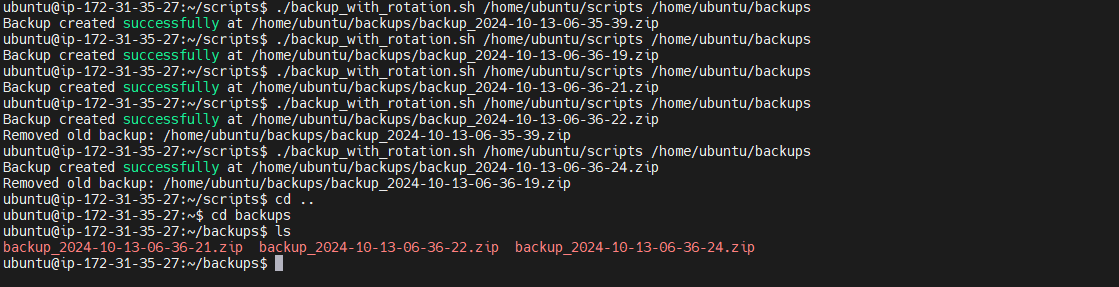
In this guide, we've walked through the creation of a robust bash script that automates the backup of directories with ease. By taking a directory path as a command-line argument, this script efficiently creates timestamped backup folders, ensuring that each backup is neatly organized and easily identifiable.
Moreover, we've implemented a rotation mechanism to keep only the last three backups, effectively managing storage space while maintaining the most recent data. This approach not only simplifies the backup process but also ensures that your system remains clutter-free.
Remember, automation is key to efficiency, and this backup script is a small yet powerful step in that direction.
Happy scripting!

