#Day04 of 90DayOfDevOps
Shell Scripting for DevOps: A Beginner’s Guide
Hi there! I'm Anuj Tomar, an enthusiastic and aspiring DevOps engineer and Cloud engineer with a passion for integrating development and operations to create seamless, efficient, and automated workflows. I'm driven by the challenges of modern software development and am dedicated to continuous learning and improvement in the DevOps field.
Shell scripting is an essential skill for anyone in DevOps. It helps automate repetitive tasks, manage configurations, and orchestrate complex workflows, making your work more efficient and reliable. Let’s break down what shell scripting is and see some simple examples.
What is a kernel?
A kernel is the core component of an operating system. It manages hardware resources, communicates with devices, and provides a platform for applications to run. In Linux, the kernel is responsible for tasks like memory management, process scheduling, file system management, and network communication.
What is a Shell?
A shell is a command-line interpreter that provides a user interface for interacting with an operating system. It accepts user input in the form of commands and executes them by calling appropriate system functions.
What is Linux Shell Scripting?
Linux shell scripting involves writing a series of commands in a text file that can be executed as a single unit. These scripts are typically written using a shell language like Bash, Zsh, or KornShell. They can automate repetitive tasks, create custom tools, and customize the shell environment.
Task 1:
Explain in your own words and with examples what Shell Scripting means for DevOps.
Ans.
Shell scripting is a way to automate tasks in DevOps.
It involves writing a series of commands in a text file.
These scripts can be executed as a single unit.
Common shell languages include Bash, Zsh, and KornShell.
Shell scripting helps automate repetitive tasks.
It allows for the creation of custom tools.
It can be used to customize the shell environment.
Task 2:
What is
#!/bin/bash? Can we write#!/bin/shas well?Ans.
#!/bin/bash is a special line called a shebang that specifies the interpreter used to execute a script. In this case, it tells the system to use the Bash shell to run the script.
Note: The shebang must be the first line of the script.
while #!/bin/sh: Uses the Bourne shell. It’s more POSIX-compliant and is generally compatible with different Unix shells.
Task 3:
Write a Shell Script that prints
I will complete #90DaysOfDevOps challenge.Ans.

Task 4:
- Write a Shell Script that takes user input, input from arguments, and prints the variables.
Ans.




Task 5:
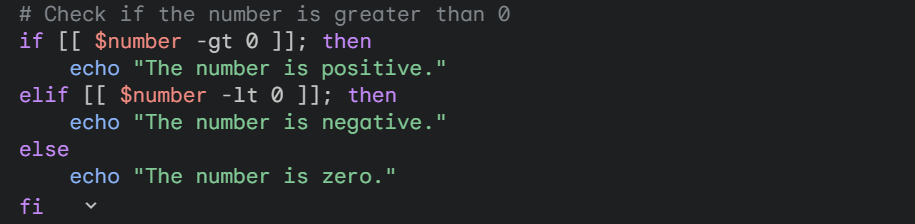
Provide an example of an If-Else statement in Shell Scripting by comparing two numbers.
Ans.
As I move forward in the challenge, I’m eager to build upon these scripting skills, applying them to real-world DevOps tasks. Stay tuned for Day 5, where I’ll be delving into more advanced topics and continuing this exciting journey through the world of DevOps!

